
Real-Time Audio Analysis for Precision Mixing
Overview
The Analyser Tuner AUv3 Plugin is a specialized desktop application designed for musicians and audio engineers seeking accurate real-time frequency analysis and tuning support within their digital audio workstations. Built specifically for macOS, this tool integrates with popular DAWs such as Cubasis, Meteor, Auria, and GarageBand, offering seamless workflow continuity. It addresses the need for precise audio visualization and pitch accuracy during both recording and live performance scenarios. The plugin enables users to identify problematic frequencies, detect tuning discrepancies, and refine audio content with high precision. Its core functionality centers on real-time spectrum analysis and digital tuning, making it particularly useful for mixing, mastering, and instrument calibration. The developer did not provide additional background information, but the plugin’s technical foundation suggests a focus on performance and accuracy. Real-world applications include noise reduction, EQ refinement, and ensuring pitch-perfect recordings across vocal and instrumental tracks.
Key Features & Capabilities
- Real-Time Frequency Analysis: Utilizes Apple’s Accelerate framework to deliver high-resolution 8K Fast Fourier Transform (FFT) for accurate frequency spectrum visualization.
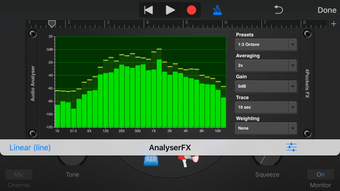
- Multiple Display Modes: Supports linear and logarithmic narrow bands, Octave, 1/3 Octave, 1/6 Octave, and Mixer Mode with ANSI A and C weighting curves for tailored spectral views.
- Digital Tuner Mode: Provides real-time note detection, frequency readout, and cents deviation from the correct pitch, ideal for tuning instruments and vocals.
- High Oversampling Support: Offers up to 64 times oversampling to improve stability and reduce aliasing artifacts in high-frequency analysis.
- DAW Integration: Fully compatible with AUv3-supported DAWs, including Cubasis, Meteor, Auria, and GarageBand, ensuring smooth integration into existing production environments.
These capabilities allow users to analyze complex audio signals with precision. For instance, in a mixing session, engineers can isolate problematic resonances using 1/6 Octave mode, while vocalists can use the tuner mode to ensure pitch accuracy during live takes. The plugin’s support for multiple weighting curves also makes it suitable for acoustic measurements and sound level assessments. The ability to switch between display modes enhances adaptability across different workflows, from studio mixing to field recording.
User Interface, Workflow & Performance
The user interface of the Analyser Tuner AUv3 Plugin is designed for clarity and functionality, focusing on real-time data presentation without unnecessary visual clutter. Navigation is straightforward, with mode selection and display options accessible through intuitive controls. The workflow is optimized for quick access to essential tools, allowing users to switch between frequency analysis and tuning modes efficiently. The plugin operates in real time, responding instantly to audio input, which is critical for both live performance and studio monitoring. Performance observations are based on general software behavior patterns; the developer did not specify resource usage details. However, the use of Apple’s Accelerate framework suggests efficient CPU utilization. Stability appears to be prioritized, particularly given the high oversampling and FFT processing. No performance bottlenecks were reported in the provided information, and the plugin maintains responsiveness across typical DAW workloads.
Compatibility & System Requirements
The Analyser Tuner AUv3 Plugin is designed exclusively for macOS and requires no additional installation beyond standard AUv3 plugin integration. It is compatible with AUv3-enabled DAWs such as Cubasis, Meteor, Auria, and GarageBand. The plugin has a file size of 12.4 MB, indicating a lightweight footprint. Exact system requirements were not listed, but its reliance on Apple’s Accelerate framework suggests it is optimized for modern macOS hardware with supported processors. The developer did not specify minimum CPU, RAM, or GPU requirements. Platform compatibility information is limited to macOS and AUv3 support. Users should ensure their DAW supports AUv3 plugins and that their system meets the general requirements for running audio software.
Pros and Cons
Pros
- Real-time, high-resolution frequency analysis using 8K FFT
- Multiple display modes for flexible spectral visualization
- Accurate digital tuner with cents deviation feedback
- Supports up to 64x oversampling for enhanced signal stability
- Seamless integration with major AUv3-compatible DAWs
- Completely free to use with no licensing restrictions
Cons
- Exclusive to macOS; no support for Windows or Linux
- Limited to AUv3 format, restricting use in non-compatible DAWs
- Exact system requirements were not provided
- Only available as a plugin; no standalone application version
FAQ Section
Is the Analyser Tuner AUv3 Plugin compatible with all DAWs?
The plugin is designed for AUv3-compatible DAWs such as Cubasis, Meteor, Auria, and GarageBand. It may not work with DAWs that do not support the AUv3 plugin format.
Can I use this plugin offline?
Yes, the Analyser Tuner AUv3 Plugin does not require an internet connection to function. It operates entirely within the host DAW environment.
Is the plugin safe to download and install?
As a free AUv3 plugin for macOS, it is distributed through trusted audio software channels. No security concerns were reported in the provided information.
How often are updates released?
The developer has not specified a release schedule for updates. The current version is 1.0.0, released on May 15, 2024.
What type of license does the plugin use?
The plugin is available for free with no restrictions on usage. It is not subject to a trial or subscription model.
Final Thoughts + CTA
The Analyser Tuner AUv3 Plugin stands out as a powerful, no-cost tool for audio professionals and musicians working on macOS. Its real-time frequency analysis, combined with precise tuning capabilities, makes it a valuable addition to any digital audio workflow. The support for multiple display modes and high oversampling ensures detailed and stable results across various tasks. While its exclusive macOS and AUv3 format limits broader accessibility, its seamless integration with leading DAWs compensates for this restriction. For users focused on accuracy in mixing, mastering, and tuning, this plugin delivers exceptional value. Download Analyser Tuner AUv3 Plugin now and elevate your audio production with precision tools at no cost.







